1.什么是爬虫
简单说就是自动发送网络请求获取网页数据的程序,称为crawler理论上,只要能够发起网络请求并处理返回数据的语言都可以用来编写爬虫程序.
只要是可以用网页请求的数据都可以被爬虫程序爬取下来,因为本质上,爬虫程序就是在模仿浏览器客户端或者说浏览器客户端即是对爬虫程序的用户友好型封装.当然这种说法并不是很严谨,因为浏览器并不只是在爬取网络服务器上的网页.
2.什么语言适合爬虫
虽然只要有网络API即可实现爬虫,然而从适用性的角度看能力却大相径庭.例如Python请求网页只消
1
2
| import requests
response = requests.get(url)
|
然而像Java却要
1
2
3
4
5
6
7
8
9
10
11
12
| HttpClient client = HttpClient.newHttpClient();
HttpRequest request =
HttpRequest.newBuilder()
.uri(URI.create(url))
.build();
HttpResponse<String> response =
client.send(
request,
HttpResponse.BodyHandlers.ofString()
);
|
这其中固然有Python底层封装的原因,但更重要的还是生态支持不同,因为Python基本涵盖了从爬取数据,解析数据,处理数据,存储数据一系列链路.
所以Python基本上是爬虫的事实标准.当然,也不尽然.Go在高并发,大规模爬取时相比Python有性能上的优势.如果要考虑极致性能,C++则则是更好的选择.大型搜索引擎底层都是C++构建的.
3.什么可以爬
一般地,在网站根目录例如https://example/robots.txt上都会有一个文件robots.txt提示爬虫程序哪些内容可以爬,哪些内容不能爬.需要注意的是,这仅仅只是个道德约束,它事实上并不能约束什么.
一个典型的robots.txt文件如下(取自豆瓣)
1
2
3
4
5
6
7
8
9
10
11
12
13
14
15
16
17
18
19
20
21
22
23
24
25
26
27
28
29
30
31
32
33
34
35
36
37
38
| User-agent: *
Disallow: /subject_search
Disallow: /amazon_search
Disallow: /search
Disallow: /group/search
Disallow: /event/search
Disallow: /celebrities/search
Disallow: /location/drama/search
Disallow: /forum/
Disallow: /new_subject
Disallow: /service/iframe
Disallow: /j/
Disallow: /link2/
Disallow: /recommend/
Disallow: /doubanapp/card
Disallow: /update/topic/
Disallow: /share/
Disallow: /people/*/collect
Disallow: /people/*/wish
Disallow: /people/*/all
Disallow: /people/*/do
Allow: /ads.txt
Sitemap: https://www.douban.com/sitemap_index.xml
Sitemap: https://www.douban.com/sitemap_updated_index.xml
# Crawl-delay: 5
User-agent: Wandoujia Spider
Disallow: /
User-agent: Mediapartners-Google
Disallow: /subject_search
Disallow: /amazon_search
Disallow: /search
Disallow: /group/search
Disallow: /event/search
Disallow: /celebrities/search
Disallow: /location/drama/search
Disallow: /j/
|
其中User-agent: *意思是以下规则适用于所有爬虫程序,User-agent: Wandoujia Spider意为如下规则仅适用于Wandoujia Spider
Disallow: /subject_search的意思是禁止爬取https://www.douban.com/search,而Disallow: /意为整个网站都禁止爬取.
而Allow: /ads.txt则允许爬取ads.txt,这是一个广告文件.
Sitemap则是网站给出的目录说明,里面给出了可以爬取的页面目录.
# Crawl-delay: 5是每次请求间隔至少5s的意思,不过这里注释掉了,所以你可以无视它
4.一个简单的爬虫示例
这里采用Python给出一个爬取豆瓣电影top250的示例
4.1环境准备
首先为了示例我们需要创建一个Python虚拟环境,这里使用uv来创建虚拟环境.
Linux下在shell执行
1
| curl -LsSf https://astral.sh/uv/install.sh | sh
|
安装uv.Windows下在PowerShell执行
1
| iwr https://astral.sh/uv/install.ps1 -useb | iex
|
需要注意的是,uv本身并不包含Python,它只是单纯地从系统检查可用的python版本并复制到当前虚拟环境.venv,如果系统没有安装指定的Python版本,那么uv将无法创建对应的版本.
安装好uv后执行
1
| mkdir -p crawler && cd crawler && uv init
|
创建项目文件夹并创建uv环境.如果要指定uv版本,则使用
1
| uv init --python python3.8
|
来指定需要的Python版本.
然后安装爬虫程序需要用到的几个包
这将自动安装requests和bs4这两个包
4.2程序编写
接着进进入到编写程序环节
首先我们导入requests包,这样即可发起网络请求
1
2
| import requests
response = requests.get("https://movie.douban.com/top250")
|
这将向传入的URL发起一个请求并接收服务器的返回数据
然而我们如果打印这个响应
1
2
3
| import requests
response = requests.get("https://movie.douban.com/top250")
print(response)
|
就会得到<Response [418]>,这说明服务器直接拒绝了我们的请求.
本质上response是一个对象,内置了众多成员变量.例如
1
2
3
4
5
6
7
8
9
10
11
12
13
14
| response = {
"status_code": 200,
"headers": {
...
},
"cookies": {
...
},
"text": """
<html>
...
</html>
"""
}
|
而服务端在看到headers中的User-Agent为python-requests/3.13后知晓了这是一个爬虫程序,因此就拒绝了响应,这即是为何返回418.
知道这一点,我们即可借助伪装成浏览器的方式绕过反爬的限制.
打开浏览器随便进入到一个网页,按下F12进入开发者模式,点击网络一栏下的URL即可看到当前浏览器的请求头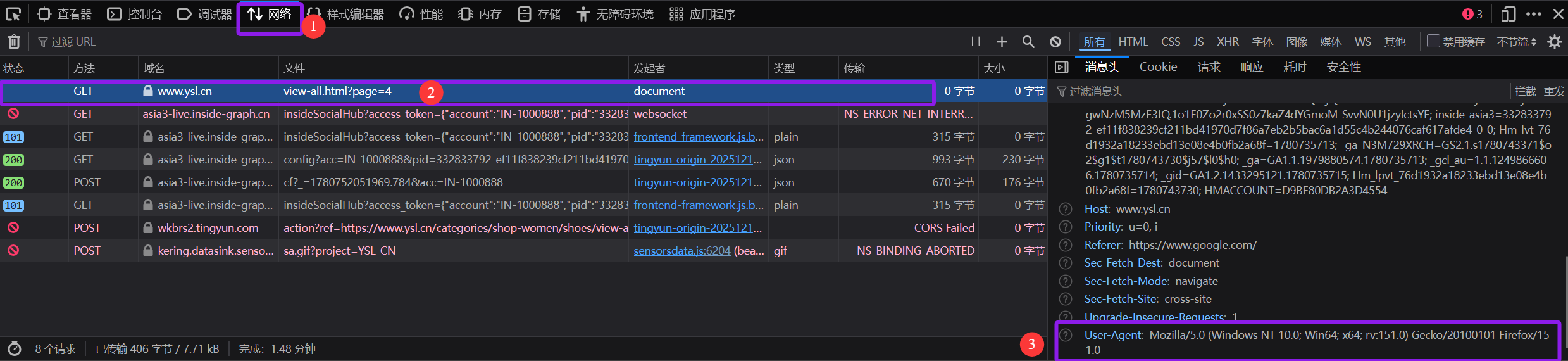
我们复制这个请求头,在爬虫程序中加上即可绕过反爬限制,需要注意的是,User-Agent的键值都需要加引号,否则会被识别为两个字符串做减法.
1
2
3
4
5
6
| import requests
headers = { "User-Agent": "Mozilla/5.0 (Windows NT 10.0; Win64; x64; rv:151.0) Gecko/20100101 Firefox/151.0" }
response = requests.get("https://movie.douban.com/top250", headers=headers)
print(response)
|
再次运行即可得到<Response [200]>的成功请求码
接下来,我们可以尝试看看输出response的text成员
1
2
3
4
5
6
| import requests
headers = { "User-Agent": "Mozilla/5.0 (Windows NT 10.0; Win64; x64; rv:151.0) Gecko/20100101 Firefox/151.0" }
response = requests.get("https://movie.douban.com/top250", headers=headers)
print(response.text)
|
这将得到网页原本的html元数据.
4.2.1引入BeautifulSoup
接下来就要用到bs4
1
| from bs4 import BeautifulSoup
|
注意到这里和导入requests不同,因为使用的是对象的方法.先看如何使用
1
| soup = BeautifulSoup(response.text, "html.parser")
|
这是在将前面发出请求后得到的数据用BeautifulSoup进行处理,处理的方式是html.parser,这个html.parser称为解析器(Parser).解析器将告诉BSoup以何种方式来处理传入的对象.在这里,html.parser告诉BSoup以html的格式解析传入的response的text成员.然后BSoup就按照html的格式一个标签一个标签地收集数据建立树以供查询.
1
2
3
4
5
6
7
8
| import requests
from bs4 import BeautifulSoup
headers = { "User-Agent": "Mozilla/5.0 (Windows NT 10.0; Win64; x64; rv:151.0) Gecko/20100101 Firefox/151.0" }
response = requests.get("https://movie.douban.com/top250", headers=headers)
soup = BeautifulSoup(response.text, "html.parser")
titles = soup.find_all("span", class_="title")
print(titles)
|
这里,find_all函数将查找调用对象内所有span标签且class名为title的span标签并返回一个数组.输出这个数组即可得到所有span标签.
需要注意的是获取到的span标签是包含html标记在内的,例如<span class="title">触不可及</span>,如果要剥离可以调用text成员函数
当然,也可以对这个数组进行遍历得到每个标签
1
2
3
4
5
6
7
8
9
| import requests
from bs4 import BeautifulSoup
headers = { "User-Agent": "Mozilla/5.0 (Windows NT 10.0; Win64; x64; rv:151.0) Gecko/20100101 Firefox/151.0" }
response = requests.get("https://movie.douban.com/top250", headers=headers)
soup = BeautifulSoup(response.text, "html.parser")
titles = soup.find_all("span", class_="title")
for title in titles:
print(title.text)
|
这样我们可以得到每个标签内的内容,然而与预期不符的是,这只有25个条目,与预期的250不符.
4.2.2观察待爬取的页面特征
事实上,这很正常.因为一个URL页面就是显示25个条目.
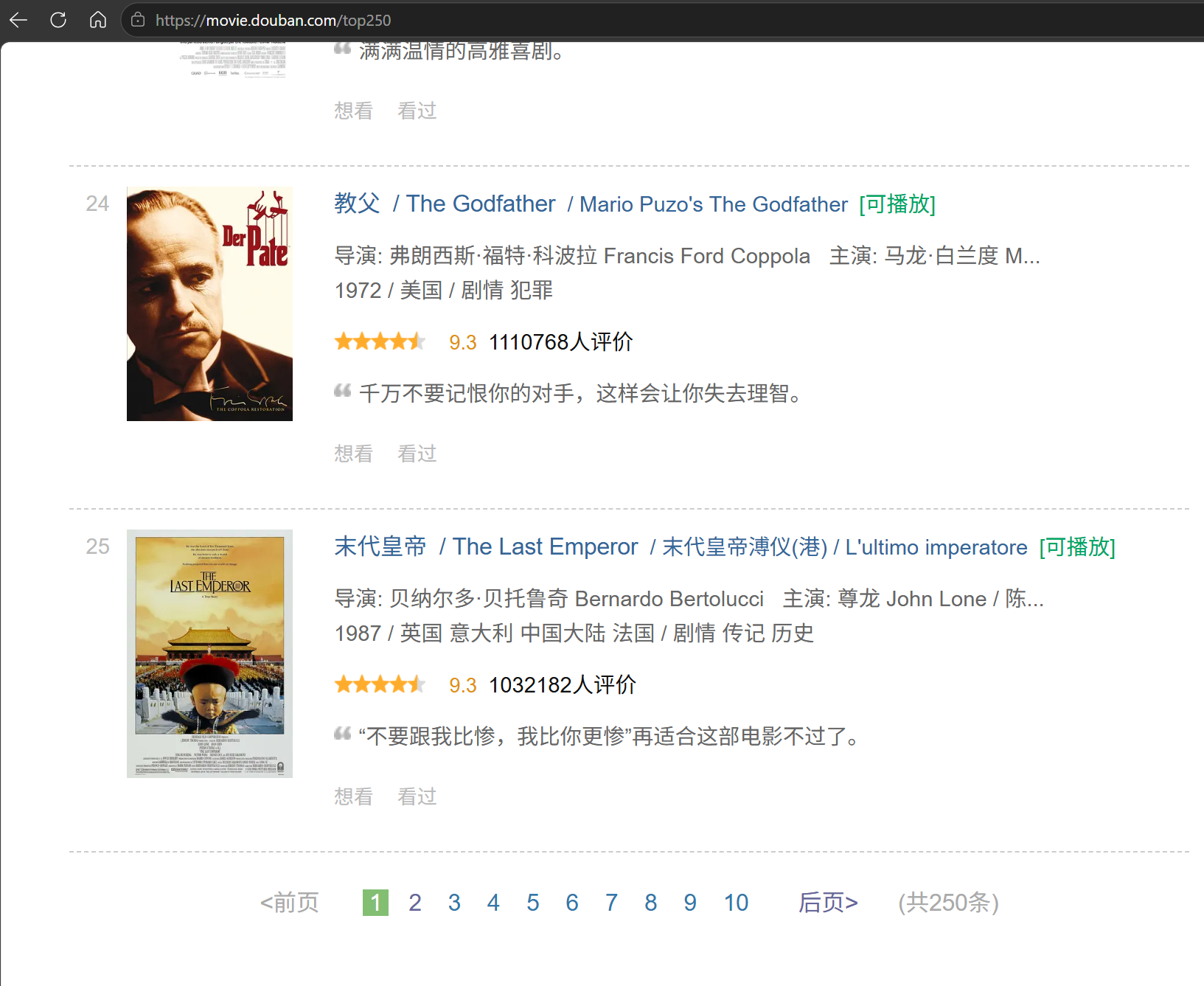
观察便可发现,一页显示25部,一共25页共250部.
而我们之前采用的URL是固定的,并不能很好地处理其余页面.观察可以发现
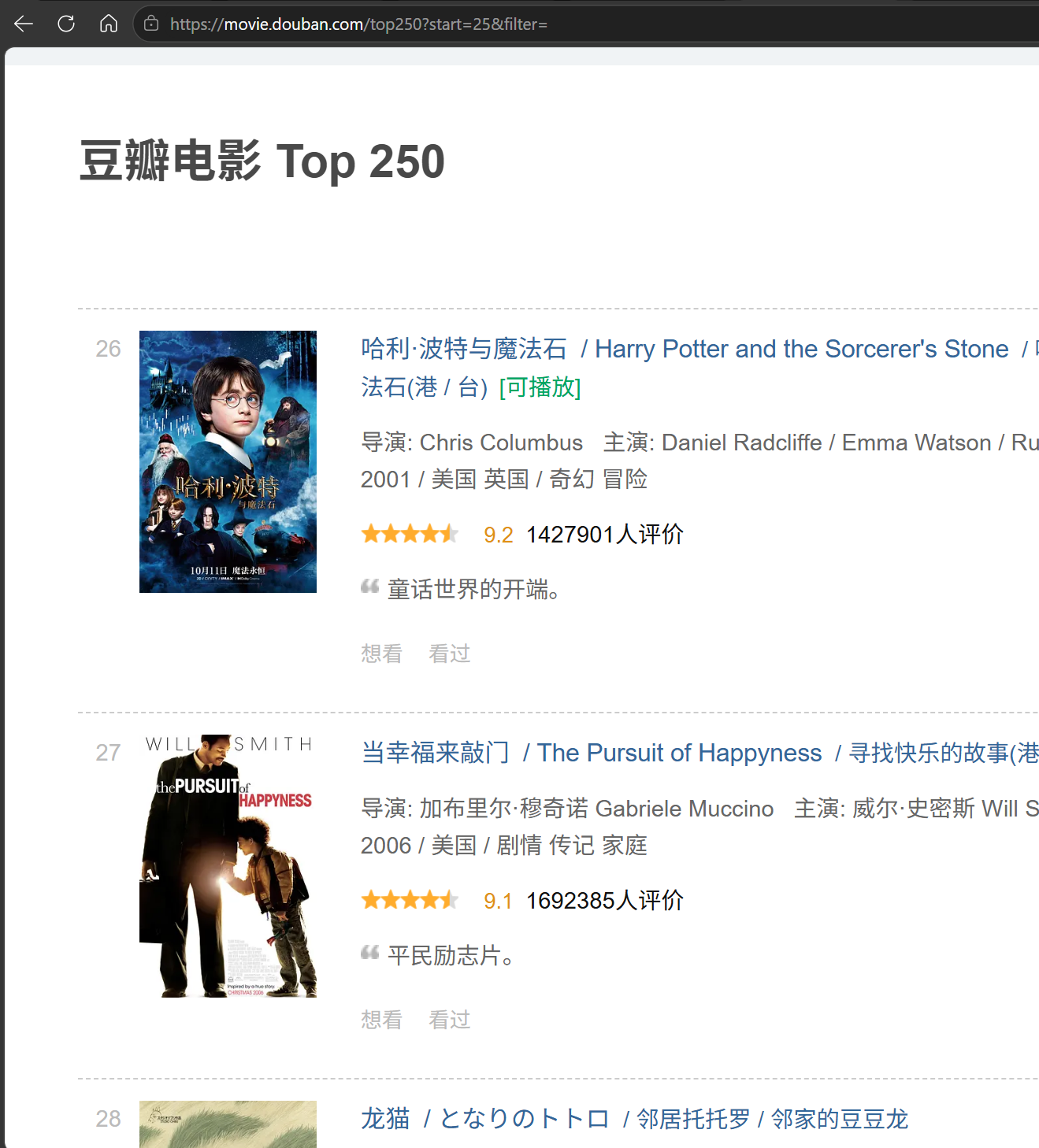
每个页面的URL事实上是[豆瓣电影 Top 250](https://movie.douban.com/top250?start=25),其中start是每一页起始编号-1
我们可以直接以浏览器访问任意
$$
start=N,N\in[0,249]
$$
进行验证,例如`[豆瓣电影 Top 250](https://movie.douban.com/top250?start=249)`
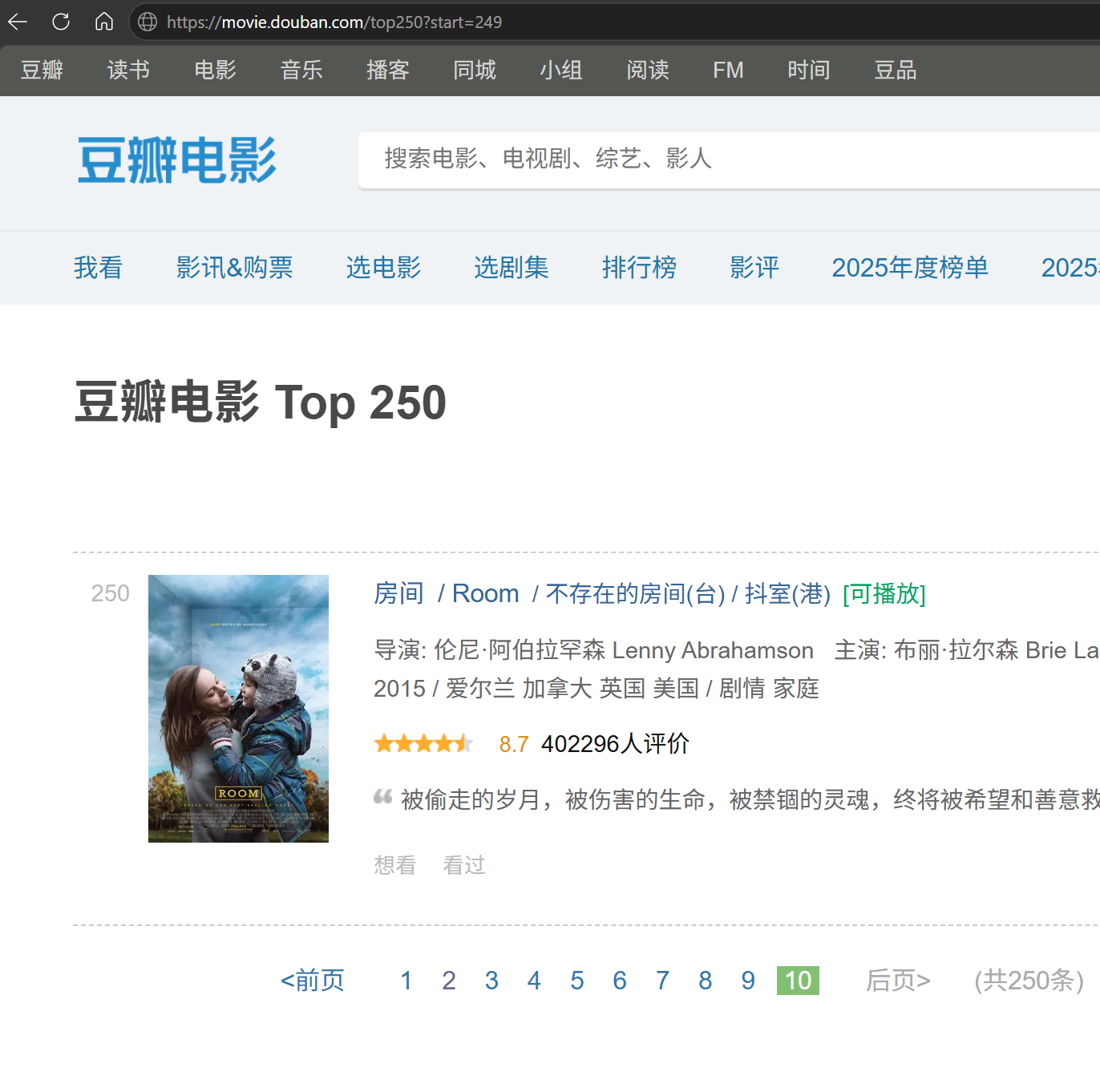
因此,对于一共10页每页25部的榜单,只用把start处的数字自增25并与https://movie.douban.com/top250?start=的URL前缀拼接在一起即可无重复地遍历整个榜单.因此,很容易写出如下代码
1
2
3
4
5
6
7
8
9
10
11
12
| import requests
from bs4 import BeautifulSoup
headers = { "User-Agent": "Mozilla/5.0 (Windows NT 10.0; Win64; x64; rv:151.0) Gecko/20100101 Firefox/151.0" }
for index in range(0, 250, 25):
url = "https://movie.douban.com/top250?start=" + str(index)
response = requests.get(url, headers=headers)
soup = BeautifulSoup(response.text, "html.parser")
titles = soup.find_all("span", class_="title")
for item in titles:
print(item.text)
|
首先是请求头,然后我们需要动态拼接一个URL发起请求,用BSoup解析后查找标题的span标签输出,之后转向下一个URL.
这已经可以实现爬取top250的需求了.但是这里两个部分缠在一起——电影名的中文和英文都是span标签标记且都称作title.为此,可以用find而非find_all成员函数.find_all查找所有匹配的并返回一个数组,而find仅查找首个匹配的.利用这一点,我们可以先定位到span标签外部的标签div,从这个标签出发查找首个匹配的,于是有
1
2
3
4
5
6
7
8
9
10
11
12
13
14
| import requests
from bs4 import BeautifulSoup
headers = { "User-Agent": "Mozilla/5.0 (Windows NT 10.0; Win64; x64; rv:151.0) Gecko/20100101 Firefox/151.0" }
sequence = 1
for index in range(0, 250, 25):
url = "https://movie.douban.com/top250?start=" + str(index)
response = requests.get(url, headers=headers)
soup = BeautifulSoup(response.text, "html.parser")
info = soup.find_all("div", class_="info")
for item in info:
title = item.find("span", class_="title")
print("第" + str(sequence) + "部: " + title.text)
sequence += 1
|
当然,由于find_all事实上是返回一个数组,我们可以对其取下标,这样可以任意取想要的span,而无需通过find返回首个匹配的特性来查找.
1
2
3
4
5
6
7
8
9
10
11
12
13
14
15
| import requests
from bs4 import BeautifulSoup
headers = { "User-Agent": "Mozilla/5.0 (Windows NT 10.0; Win64; x64; rv:151.0) Gecko/20100101 Firefox/151.0" }
sequence = 1
for index in range(0, 250, 25):
url = "https://movie.douban.com/top250?start=" + str(index)
response = requests.get(url, headers=headers)
soup = BeautifulSoup(response.text, "html.parser")
info = soup.find_all("div", class_="info")
for item in info:
titles = item.find_all("span", class_="title")
en_title = titles[1].text.strip().lstrip("/ ").strip() if len(titles) > 1 else ""
print(f"第{sequence}部: {en_title}")
sequence += 1
|
这里先在每个div内查找所有span标签,然后以数组的方式选中需要的标题.strip().lstrip("/ ").strip()是为了除去名称两端的空格和/.有的电影并无外文名,因此选中前需要先判断是否存在外文名.将两种方式组合即得到最终的爬虫程序
1
2
3
4
5
6
7
8
9
10
11
12
13
14
15
16
| import requests
from bs4 import BeautifulSoup
headers = { "User-Agent": "Mozilla/5.0 (Windows NT 10.0; Win64; x64; rv:151.0) Gecko/20100101 Firefox/151.0" }
sequence = 1
for index in range(0, 250, 25):
url = "https://movie.douban.com/top250?start=" + str(index)
response = requests.get(url, headers=headers)
soup = BeautifulSoup(response.text, "html.parser")
info = soup.find_all("div", class_="info")
for item in info:
titles = item.find_all("span", class_="title")
cn_title = titles[0].text
en_title = titles[1].text.strip().lstrip("/ ").strip() if len(titles) > 1 else ""
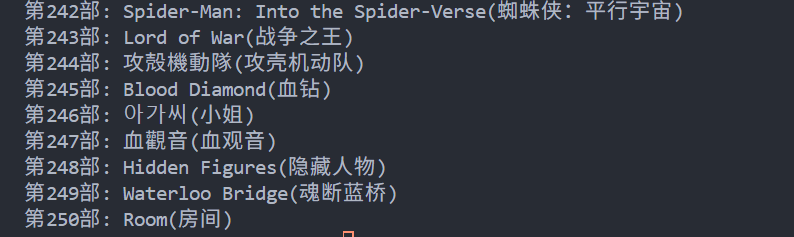
print(f"第{sequence}部: {en_title}({cn_title})")
sequence += 1
|
效果如下
5.结语
事实上,这只是很简单的爬虫.爬虫可以称得上一项系统工程.有专业的框架和工具,平日里用的浏览器无时无刻不在爬取公网上的页面.这里只是简单的使用,再难的我目前也不会.由以上示例不难看出爬虫的关键之处在于页面元素的选中与抓取,当然这只是冰山一角,除了元素标签选择外还有CSS选择等等.而且,涉及到大批量的爬取时,问题的瓶颈可以想象得到应该是并发.
评论